
Let an agent run the rollout: automating edge AI deployments with Beam AI
A model release across many sites fails one node at a time. Here's how an AI agent can run a staged rollout through Beam AI's MCP server, while your team sets the rules.
A model release across 150 sites rarely fails all at once. It fails one node at a time: a site that missed its update window, a GPU node that came up on the wrong runtime, an error rate creeping up at three locations while the rest look fine. Someone has to watch, compare, decide, and act, again and again, until the whole fleet is on the right version.
That loop of checking, acting, and checking again is work AI agents are well suited to. Siden Beam AI exposes every fleet operation through an MCP server, so an agent can run a rollout from start to finish while your team sets the rules and makes the calls that matter.
Why rollouts suit agents
An edge rollout is a few well-defined operations with judgment in between. The operations are short: deploy, check status, update, roll back. The judgment is everywhere else. Is a higher error rate at one site noise or a regression? Should the next footprint wait until the offshore nodes report in?
Scripts handle the operations well but lock the judgment into thresholds someone wrote months ago. An agent reads the telemetry in context, explains what it sees, and calls the same operations a script would. People stay in charge of the policy: which sites go first, what counts as a regression, and which steps need a human yes.
How an agent connects to Beam AI
Every Beam AI operation is an API call, and you can reach it three ways: pipelines use the REST API, engineers use the CLI, and AI agents use the MCP server.
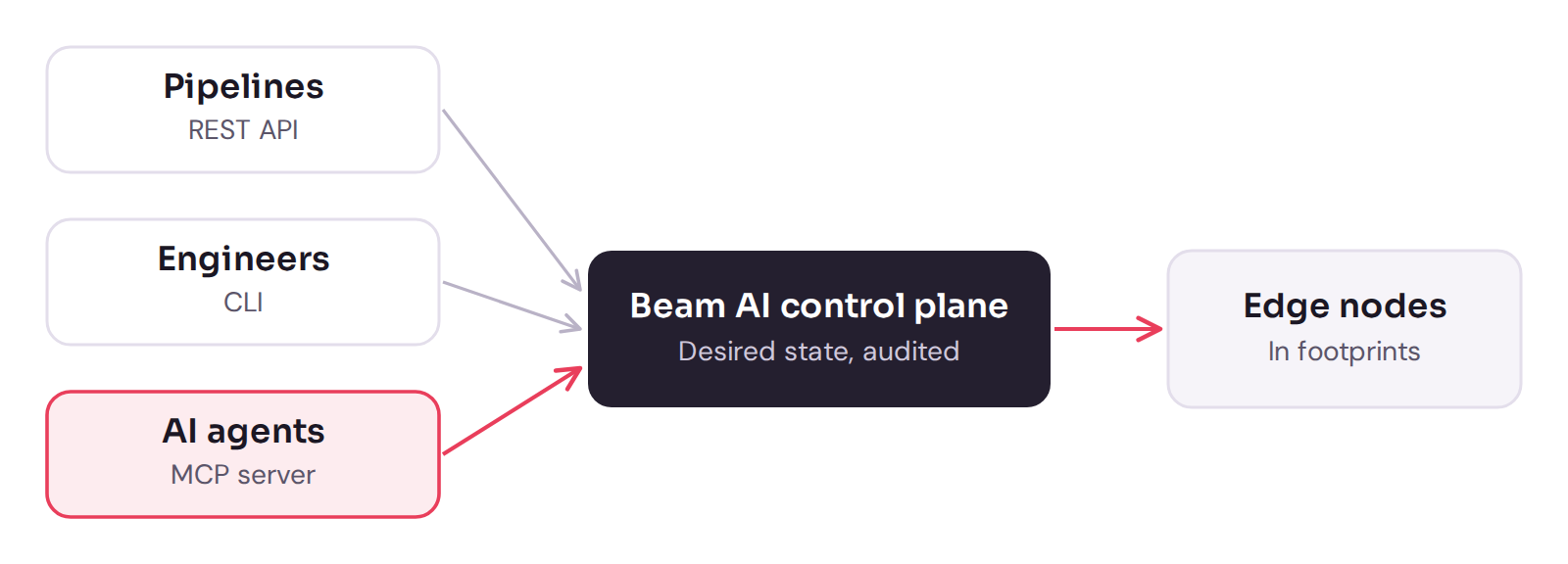
The Model Context Protocol (MCP) is an open standard for connecting AI assistants to the systems where data lives. Connect an MCP-capable agent to Beam AI's MCP server and the platform's operations appear to it as tools: deploy a model to a node or footprint, check status, push an update, roll back.
The agent works through the same control plane as everyone else. It changes the desired state, the nodes converge on it, and every model stays a versioned artifact with a record of what runs where.
Walkthrough: an agent runs a staged rollout
Here is what an agent-run rollout can look like. The example is illustrative, but every step uses an operation Beam AI exposes today.
An operations engineer gives the agent its instructions in plain language:
Roll out vision model v8 to the energy fleet. Start with the onshore wellpad footprint. If error rate and latency stay within 10% of v7 for 30 minutes, ask me before moving to the offshore footprint. If anything regresses, roll that footprint back to v7 and tell me why.
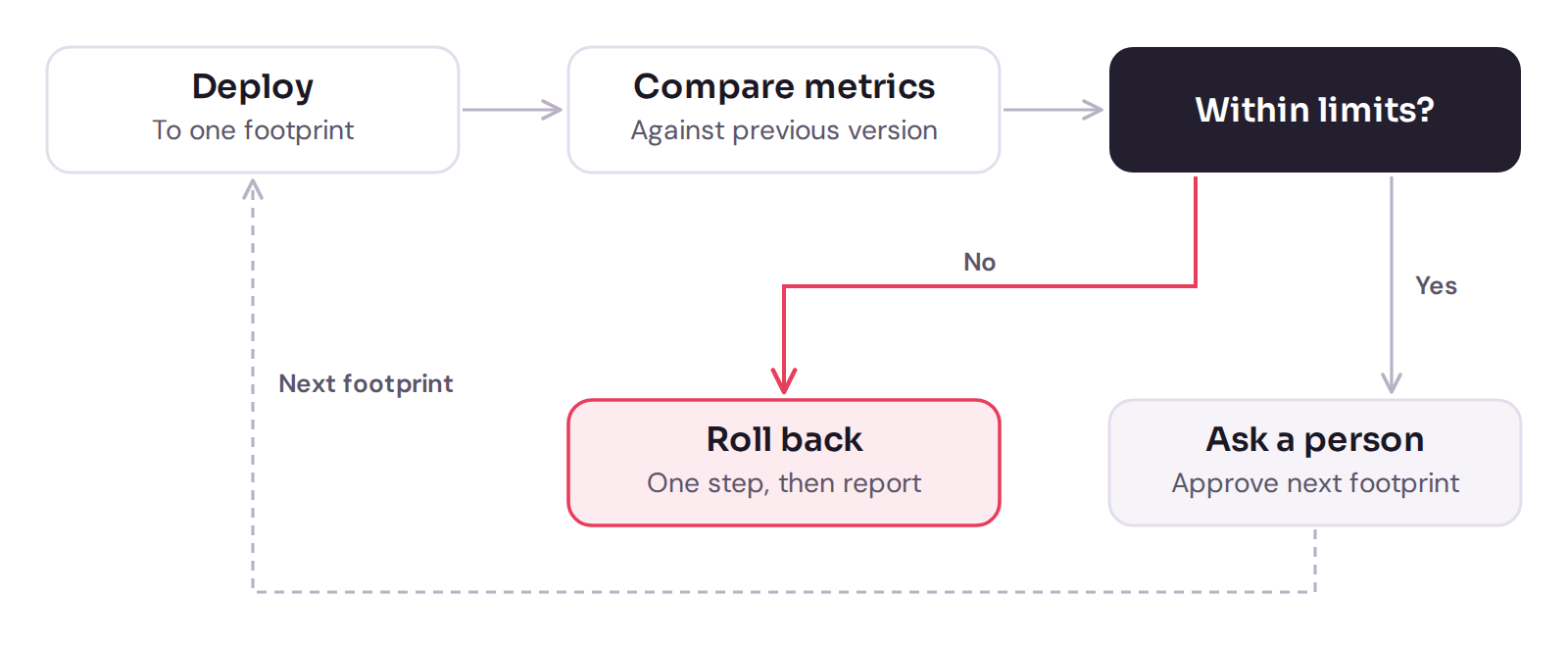
The agent checks which nodes are online, deploys v8 to the wellpad footprint, and compares request volume, latency, and error rate against v7. The control plane does the heavy lifting: nodes converge on the new desired state, and nodes that are offline pick it up when their link returns. The agent's job is to watch, judge, and report.
Half an hour later, it reports back:
v8 is serving on 42 of 44 wellpad nodes. Two nodes at one site are offline and will update when their link returns. Error rate and latency are within 3% of v7. Ready to start the offshore footprint (18 nodes). Approve?
One reply and it moves on. If the offshore numbers had drifted, it would have rolled that footprint back to v7 in one step and explained what it saw, before anyone had to open the console. The agent repeats this deploy-and-compare loop for each footprint, stopping for a person's approval between them.
Agents and CI/CD: use both
Agents don't replace your pipeline. Use a pipeline for what should happen the same way every time, and an agent where someone would otherwise be watching and deciding.
| Job | Best fit | Why |
|---|---|---|
| Register a new model version after tests pass | CI/CD | Same steps every time |
| Deploy to a lab or staging footprint | CI/CD | Repeatable, no judgment needed |
| Staged production rollout | Agent, with human approval | Reads telemetry between stages |
| Investigate a regression at a few sites | Agent | Compares nodes, versions, and health in context |
| Answer "what's running where?" | Agent | Fleet questions in plain language |
| Emergency rollback | Either | One versioned step, from anywhere |
Because both call the same API, a pipeline can register a model and hand the production rollout to an agent, and the record of what runs where stays in one place.
Guardrails for handing rollouts to an agent
Delegating a rollout is lower-risk because the agent works through the same audited control plane as your team, and a model release can be rolled back in one step. A few habits make it safe in practice:
- Start with questions. Let the agent answer fleet questions and summarize health before you ask it to change anything.
- Keep a person on the gates. Have the agent ask before each production footprint, as in the walkthrough.
- Scope by footprint. Tell the agent which footprints it may work on, starting with a lab or low-risk one, and widen that as it earns trust.
- Write the policy down. Put thresholds and stop conditions in the instructions or a runbook the agent reads, so its behavior can be reviewed.
- Lean on versioning. Every model is a versioned artifact, so a bad model release is one rollback away, including on nodes that were offline when it happened.
- Keep one record. Agent actions go through the control plane like any other change, so the history of what ran where stays complete.
Try it on your own fleet
The fastest way to see an agent run a rollout is on your own hardware. A Beam AI pilot runs alongside your team in four milestones: enroll your nodes, register a model, deploy it, then run a staged update across your footprints. You can drive each step from the console, the CLI, a pipeline, or an agent through the MCP server.
Want to see an agent run a rollout? Join the waitlist and try it on your own nodes.